方案|在 Intel 双 Arc B580 上使用 vLLM v0.19.1 + FP8 驱动 Gemma-4-E4B-it 为 OpenClaw 提供本地 Token 服务实战
近年来,本地大模型部署越来越受到重视,尤其是希望保护隐私、降低延迟并实现真正自主 Agent 的用户。Gemma-4-E4B-it 作为 Google 推出的高效 4B 参数模型,在 tool calling、指令遵循和多轮对话方面表现优秀,非常适合作为 OpenClaw 这类开源 AI Agent 的后端大脑。
1. 引言
我使用了两张 Intel Arc B580(每张 12GB,共 24GB VRAM),结合 vLLM v0.19.1 的 XPU 支持,通过 FP8(权重 + KV Cache)量化,在消费级硬件上实现了相对流畅的本地推理服务。本文将完整分享从镜像编译、Docker Compose 部署,到实际运行监控和为 OpenClaw 设计工具任务的全过程。
希望通过这篇实战文章,能帮助更多对 Intel XPU 或本地 Agent 感兴趣的朋友少走弯路,快速搭建自己的本地 token 服务。
2. 硬件与环境准备
我的硬件配置为双 Intel Arc B580 显卡,每卡 12GB 显存,总计 24GB VRAM。主机配备了足够的 CPU 和内存(建议至少 64GB 系统内存,以应对双卡 tensor parallel 的通信开销)。
系统环境基于 Ubuntu 24.04,提前安装了 Intel 最新 GPU 驱动、Level Zero runtime 以及 oneAPI Base Toolkit。这些是 vLLM-XPU 正常工作的基础,尤其是多卡并行时对 oneCCL 通信的支持非常关键。
此外,我还准备了 HTTP/HTTPS 代理(192.168.123.254:7890),用于加速模型下载和依赖编译。如果你在国内环境部署,强烈建议提前配置好代理和 HF mirror。
3. vLLM-XPU 镜像编译
vLLM 对 Intel XPU 的支持还在快速迭代中,官方预构建的 intel/vllm:xpu 镜像版本往往滞后或缺少特定优化。因此,对于 v0.19.1 + 双 B580 + FP8 的组合,我选择了自行编译 Docker 镜像。
推荐的编译命令如下:
docker build \
  --build-arg http_proxy=http://192.168.123.254:7890 \
  --build-arg https_proxy=http://192.168.123.254:7890 \
  --build-arg no_proxy=".ubuntu.com,.intel.com,.pypi.org,.pythonhosted.org,localhost,127.0.0.1" \
  -f docker/Dockerfile.xpu \
  -t hub.yiqisoft.cn/vllm/vllm-xpu:v0.19.1 \
  --shm-size=8g \
  --no-cache \
  .
为什么需要注意这些参数?
--build-arg: 主要是加速 python 组件安装速度。--shm-size=8g:双卡 tensor parallel 需要较大的共享内存,4g 容易出现通信问题,建议至少设为 8g。--no-cache:第一次构建时推荐使用,确保拉取最新的 Torch XPU wheel 和依赖。no_proxy:避免代理干扰 Intel 和 PyPI 的官方下载。
整个编译过程通常需要 40~90 分钟,取决于网络和机器性能。构建完成后,建议运行简单验证命令,确认 Torch XPU 可用以及 vLLM 版本正确。
验证 docker image 编译完成
docker images

IMAGE                                     ID                 DISK USAGE     CONTENT SIZE    EXTRA
hub.yiqisoft.cn/vllm/vllm-xpu:v0.19.1     25524b1ed7f4       34.2GB         8.43GB          U
4. Docker Compose 配置详解
镜像准备好后,我使用 Docker Compose 来管理服务,便于启动、停止和版本控制。以下是我的完整配置:
services:
  vllm:
    image: hub.yiqisoft.cn/vllm/vllm-xpu:v0.19.1
    container_name: vllm
    restart: unless-stopped
    network_mode: host
    privileged: true
    ipc: host
    devices:
      - /dev/dri:/dev/dri
      - /dev/dri/by-path:/dev/dri/by-path
    volumes:
      - ~/.cache/huggingface:/root/.cache/huggingface
      - ~/models:/models
    environment:
      - VLLM_LOGGING_LEVEL=INFO
      - CCL_ATL_TRANSPORT=ofi
      - CCL_ZE_IPI=0
      - ZE_AFFINITY_MASK=0,1
      - ONECCL_P2P_DISABLE=1
      - FI_PROVIDER=tcp
      - FI_TCP_IFACE=lo
    entrypoint: /bin/bash
    command:
      - "-c"
      - |
        vllm serve \
          /models/gemma-4-E4B-it \
          --served-model-name google/gemma-4-E4B-it \
          --tensor-parallel-size 2 \
          --enforce-eager \
          --attention-backend TRITON_ATTN \
          --gpu-memory-utilization 0.8 \
          --tool-call-parser gemma4 \
          --enable-auto-tool-choice \
          --quantization fp8 \
          --kv-cache-dtype fp8 \
          --disable-custom-all-reduce
关键参数说明:
entrypoint: /bin/bash 启动容器,否则容易造成双卡之间的通信错误。/models/gemma-3-E4B-it: 指定本地模型目录,避免下载模型卡死。--tensor-parallel-size 2:开启双卡并行,充分利用 24GB 显存。--quantization fp8 --kv-cache-dtype fp8:同时对权重和 KV Cache 进行 FP8 量化,大幅降低显存占用(亲测下来,节省非常多,否则启动可以,token太低)。--tool-call-parser gemma4 --enable-auto-tool-choice:启用 Gemma-4 专用的 tool calling 解析,提升 Agent 工具调用成功率。--attention-backend TRITON_ATTN和--enforce-eager:当前 XPU 上更稳定的配置选择。max-model-len: 可以根据自己的需求设置默认 token 长度,不指定就以:128KB 作为基数。
启动命令非常简单:docker compose up -d
5. 运行过程实时展示
服务启动后,最直观的方式就是实时观察它的运行状态。下面是我实际部署中的几类监控展示(配对应截图)。
5.1 vLLM 服务日志实时监控
使用命令 docker logs -f vllm 可以实时查看服务输出。
(APIServer pid=1) INFO 04-26 02:43:22 [utils.py:299]        █     █     █▄   ▄█
(APIServer pid=1) INFO 04-26 02:43:22 [utils.py:299]  ▄▄ ▄█ █     █     █ ▀▄▀ █  version 0.19.2.dev0+gb1388b1fb.d20260418
(APIServer pid=1) INFO 04-26 02:43:22 [utils.py:299]   █▄█▀ █     █     █     █  model   /models/gemma-4-E4B-it
(APIServer pid=1) INFO 04-26 02:43:22 [utils.py:299]    ▀▀  ▀▀▀▀▀ ▀▀▀▀▀ ▀     ▀
(APIServer pid=1) INFO 04-26 02:43:22 [utils.py:299]
(APIServer pid=1) INFO 04-26 02:43:22 [utils.py:233] non-default args: {'model_tag': '/models/gemma-4-E4B-it', 'enable_auto_tool_choice': True, 'tool_call_parser': 'gemma4', 'model': '/models/gemma-4-E4B-it', 'quantizati
on': 'fp8', 'enforce_eager': True, 'served_model_name': ['google/gemma-4-E4B-it'], 'attention_backend': 'TRITON_ATTN', 'tensor_parallel_size': 2, 'disable_custom_all_reduce': True, 'gpu_memory_utilization': 0.8, 'kv_cach
e_dtype': 'fp8'}
(APIServer pid=1) INFO 04-26 02:43:26 [model.py:549] Resolved architecture: Gemma4ForConditionalGeneration
(APIServer pid=1) INFO 04-26 02:43:26 [model.py:1678] Using max model len 131072
(APIServer pid=1) INFO 04-26 02:43:26 [cache.py:227] Using fp8 data type to store kv cache. It reduces the GPU memory footprint and boosts the performance. Meanwhile, it may cause accuracy drop without a proper scaling f
actor.
(APIServer pid=1) INFO 04-26 02:43:27 [vllm.py:790] Asynchronous scheduling is enabled.
(APIServer pid=1) WARNING 04-26 02:43:27 [vllm.py:848] Enforce eager set, disabling torch.compile and CUDAGraphs. This is equivalent to setting -cc.mode=none -cc.cudagraph_mode=none
(APIServer pid=1) WARNING 04-26 02:43:27 [vllm.py:859] Inductor compilation was disabled by user settings, optimizations settings that are only active during inductor compilation will be ignored.
(APIServer pid=1) INFO 04-26 02:43:27 [vllm.py:1025] Cudagraph is disabled under eager mode
(APIServer pid=1) WARNING 04-26 02:43:27 [xpu.py:181] XPU Graph is not supported in the current PyTorch version, disabling cudagraph_mode.
(APIServer pid=1) INFO 04-26 02:43:27 [compilation.py:292] Enabled custom fusions: norm_quant, act_quant
(EngineCore pid=163) INFO 04-26 02:43:43 [core.py:105] Initializing a V1 LLM engine (v0.19.2.dev0+gb1388b1fb.d20260418) with config: model='/models/gemma-4-E4B-it', speculative_config=None, tokenizer='/models/gemma-4-E4B
-it', skip_tokenizer_init=False, tokenizer_mode=auto, revision=None, tokenizer_revision=None, trust_remote_code=False, dtype=torch.bfloat16, max_seq_len=131072, download_dir=None, load_format=auto, tensor_parallel_size=2
, pipeline_parallel_size=1, data_parallel_size=1, decode_context_parallel_size=1, dcp_comm_backend=ag_rs, disable_custom_all_reduce=True, quantization=fp8, enforce_eager=True, enable_return_routed_experts=False, kv_cache
_dtype=fp8, device_config=xpu, structured_outputs_config=StructuredOutputsConfig(backend='auto', disable_any_whitespace=False, disable_additional_properties=False, reasoning_parser='', reasoning_parser_plugin='', enable_
in_reasoning=False), observability_config=ObservabilityConfig(show_hidden_metrics_for_version=None, otlp_traces_endpoint=None, collect_detailed_traces=None, kv_cache_metrics=False, kv_cache_metrics_sample=0.01, cudagraph
_metrics=False, enable_layerwise_nvtx_tracing=False, enable_mfu_metrics=False, enable_mm_processor_stats=False, enable_logging_iteration_details=False), seed=0, served_model_name=google/gemma-4-E4B-it, enable_prefix_cach
ing=True, enable_chunked_prefill=True, pooler_config=None, compilation_config={'mode': <CompilationMode.NONE: 0>, 'debug_dump_path': None, 'cache_dir': '', 'compile_cache_save_format': 'binary', 'backend': 'inductor', 'c
ustom_ops': ['all'], 'splitting_ops': [], 'compile_mm_encoder': False, 'cudagraph_mm_encoder': False, 'encoder_cudagraph_token_budgets': [], 'encoder_cudagraph_max_images_per_batch': 0, 'compile_sizes': [], 'compile_rang
es_endpoints': [2048], 'inductor_compile_config': {'enable_auto_functionalized_v2': False, 'size_asserts': False, 'alignment_asserts': False, 'scalar_asserts': False, 'combo_kernels': True, 'benchmark_combo_kernel': True
}, 'inductor_passes': {}, 'cudagraph_mode': <CUDAGraphMode.NONE: 0>, 'cudagraph_num_of_warmups': 0, 'cudagraph_capture_sizes': [], 'cudagraph_copy_inputs': False, 'cudagraph_specialize_lora': True, 'use_inductor_graph_pa
rtition': False, 'pass_config': {'fuse_norm_quant': True, 'fuse_act_quant': True, 'fuse_attn_quant': False, 'enable_sp': False, 'fuse_gemm_comms': False, 'fuse_allreduce_rms': False}, 'max_cudagraph_capture_size': 0, 'dy
namic_shapes_config': {'type': <DynamicShapesType.BACKED: 'backed'>, 'evaluate_guards': False, 'assume_32_bit_indexing': False}, 'local_cache_dir': None, 'fast_moe_cold_start': True, 'static_all_moe_layers': []}
(EngineCore pid=163) WARNING 04-26 02:43:43 [multiproc_executor.py:1014] Reducing Torch parallelism from 24 threads to 1 to avoid unnecessary CPU contention. Set OMP_NUM_THREADS in the external environment to tune this v
alue as needed.
(EngineCore pid=163) INFO 04-26 02:43:43 [multiproc_executor.py:134] DP group leader: node_rank=0, node_rank_within_dp=0, master_addr=127.0.0.1, mq_connect_ip=192.168.123.57 (local), world_size=2, local_world_size=2
(Worker pid=242) INFO 04-26 02:43:49 [parallel_state.py:1400] world_size=2 rank=1 local_rank=1 distributed_init_method=tcp://127.0.0.1:36185 backend=xccl
(Worker pid=241) INFO 04-26 02:43:49 [parallel_state.py:1400] world_size=2 rank=0 local_rank=0 distributed_init_method=tcp://127.0.0.1:36185 backend=xccl
2026:04:26-02:43:49:  242 |CCL_WARN| value of CCL_ATL_TRANSPORT changed to be ofi (default:mpi)
2026:04:26-02:43:49:  242 |CCL_WARN| could not get local_idx/count from environment variables, trying to get them from ATL
(Worker pid=241) INFO 04-26 02:43:49 [parallel_state.py:1716] rank 0 in world size 2 is assigned as DP rank 0, PP rank 0, PCP rank 0, TP rank 0, EP rank N/A, EPLB rank N/A
2026:04:26-02:43:49:  241 |CCL_WARN| value of CCL_ATL_TRANSPORT changed to be ofi (default:mpi)
2026:04:26-02:43:49:  241 |CCL_WARN| could not get local_idx/count from environment variables, trying to get them from ATL
2026:04:26-02:43:50:  241:[0] |CCL_WARN| topology recognition shows PCIe connection between devices. If this is not correct, you can disable topology recognition, with CCL_TOPO_FABRIC_VERTEX_CONNECTION_CHECK=0. This will
 assume XeLinks across devices
2026:04:26-02:43:50:  242:[1] |CCL_WARN| topology recognition shows PCIe connection between devices. If this is not correct, you can disable topology recognition, with CCL_TOPO_FABRIC_VERTEX_CONNECTION_CHECK=0. This will
 assume XeLinks across devices
(Worker_TP0 pid=241) INFO 04-26 02:43:57 [gpu_model_runner.py:4735] Starting to load model /models/gemma-4-E4B-it...
(Worker_TP0 pid=241) INFO 04-26 02:43:58 [vllm.py:790] Asynchronous scheduling is enabled.
(Worker_TP0 pid=241) WARNING 04-26 02:43:58 [vllm.py:848] Enforce eager set, disabling torch.compile and CUDAGraphs. This is equivalent to setting -cc.mode=none -cc.cudagraph_mode=none
(Worker_TP0 pid=241) WARNING 04-26 02:43:58 [vllm.py:859] Inductor compilation was disabled by user settings, optimizations settings that are only active during inductor compilation will be ignored.
(Worker_TP0 pid=241) INFO 04-26 02:43:58 [vllm.py:1025] Cudagraph is disabled under eager mode
(Worker_TP0 pid=241) WARNING 04-26 02:43:58 [xpu.py:181] XPU Graph is not supported in the current PyTorch version, disabling cudagraph_mode.
(Worker_TP0 pid=241) INFO 04-26 02:43:58 [compilation.py:292] Enabled custom fusions: norm_quant, act_quant
(Worker_TP0 pid=241) INFO 04-26 02:43:58 [__init__.py:261] Selected XPUFP8ScaledMMLinearKernel for Fp8OnlineLinearMethod
(Worker_TP0 pid=241) INFO 04-26 02:43:58 [xpu.py:58] Setting VLLM_KV_CACHE_LAYOUT to 'NHD' for XPU; only NHD layout is supported by XPU attention kernels.
(Worker_TP0 pid=241) INFO 04-26 02:43:58 [xpu.py:71] Using Triton backend.
(Worker_TP0 pid=241) INFO 04-26 02:43:58 [xpu.py:58] Setting VLLM_KV_CACHE_LAYOUT to 'NHD' for XPU; only NHD layout is supported by XPU attention kernels.
(Worker_TP1 pid=242) WARNING 04-26 02:43:58 [vllm.py:848] Enforce eager set, disabling torch.compile and CUDAGraphs. This is equivalent to setting -cc.mode=none -cc.cudagraph_mode=none
(Worker_TP1 pid=242) WARNING 04-26 02:43:58 [vllm.py:859] Inductor compilation was disabled by user settings, optimizations settings that are only active during inductor compilation will be ignored.
(Worker_TP1 pid=242) INFO 04-26 02:43:58 [vllm.py:1025] Cudagraph is disabled under eager mode
(Worker_TP1 pid=242) WARNING 04-26 02:43:58 [xpu.py:181] XPU Graph is not supported in the current PyTorch version, disabling cudagraph_mode.
(Worker_TP1 pid=242) INFO 04-26 02:43:58 [xpu.py:58] Setting VLLM_KV_CACHE_LAYOUT to 'NHD' for XPU; only NHD layout is supported by XPU attention kernels.
(Worker_TP1 pid=242) INFO 04-26 02:43:58 [xpu.py:58] Setting VLLM_KV_CACHE_LAYOUT to 'NHD' for XPU; only NHD layout is supported by XPU attention kernels.
(Worker_TP0 pid=241) INFO 04-26 02:44:05 [default_loader.py:384] Loading weights took 7.21 seconds
(Worker_TP0 pid=241) WARNING 04-26 02:44:05 [kv_cache.py:94] Checkpoint does not provide a q scaling factor. Setting it to k_scale. This only matters for FP8 Attention backends (flash-attn or flashinfer).
(Worker_TP0 pid=241) WARNING 04-26 02:44:05 [kv_cache.py:108] Using KV cache scaling factor 1.0 for fp8_e4m3. If this is unintended, verify that k/v_scale scaling factors are properly set in the checkpoint.
(Worker_TP0 pid=241) WARNING 04-26 02:44:05 [kv_cache.py:147] Using uncalibrated q_scale 1.0 and/or prob_scale 1.0 with fp8 attention. This may cause accuracy issues. Please make sure q/prob scaling factors are available
 in the fp8 checkpoint.
(Worker_TP0 pid=241) INFO 04-26 02:44:06 [gpu_model_runner.py:4820] Model loading took 6.29 GiB memory and 7.919238 seconds
(Worker_TP0 pid=241) INFO 04-26 02:44:06 [gpu_model_runner.py:5753] Encoder cache will be initialized with a budget of 2496 tokens, and profiled with 1 video items of the maximum feature size.
(Worker_TP0 pid=241) INFO 04-26 02:44:28 [gpu_worker.py:436] Available KV cache memory: 1.14 GiB
(EngineCore pid=163) INFO 04-26 02:44:29 [kv_cache_utils.py:1319] GPU KV cache size: 49,344 tokens
(EngineCore pid=163) INFO 04-26 02:44:29 [kv_cache_utils.py:1324] Maximum concurrency for 131,072 tokens per request: 2.15x
(EngineCore pid=163) INFO 04-26 02:44:31 [core.py:283] init engine (profile, create kv cache, warmup model) took 25.18 seconds
(EngineCore pid=163) INFO 04-26 02:44:38 [vllm.py:790] Asynchronous scheduling is enabled.
(EngineCore pid=163) WARNING 04-26 02:44:38 [vllm.py:848] Enforce eager set, disabling torch.compile and CUDAGraphs. This is equivalent to setting -cc.mode=none -cc.cudagraph_mode=none
(EngineCore pid=163) WARNING 04-26 02:44:38 [vllm.py:859] Inductor compilation was disabled by user settings, optimizations settings that are only active during inductor compilation will be ignored.
(EngineCore pid=163) INFO 04-26 02:44:38 [vllm.py:1025] Cudagraph is disabled under eager mode
(EngineCore pid=163) WARNING 04-26 02:44:38 [xpu.py:181] XPU Graph is not supported in the current PyTorch version, disabling cudagraph_mode.
(EngineCore pid=163) INFO 04-26 02:44:38 [compilation.py:292] Enabled custom fusions: norm_quant, act_quant
(APIServer pid=1) INFO 04-26 02:44:38 [api_server.py:592] Supported tasks: ['generate']
(APIServer pid=1) INFO 04-26 02:44:38 [parser_manager.py:202] "auto" tool choice has been enabled.
(APIServer pid=1) WARNING 04-26 02:44:38 [model.py:1435] Default vLLM sampling parameters have been overridden by the model's `generation_config.json`: `{'temperature': 1.0, 'top_k': 64, 'top_p': 0.95}`. If this is not i
ntended, please relaunch vLLM instance with `--generation-config vllm`.
(APIServer pid=1) INFO 04-26 02:44:40 [hf.py:314] Detected the chat template content format to be 'openai'. You can set `--chat-template-content-format` to override this.
(APIServer pid=1) INFO 04-26 02:44:40 [base.py:231] Multi-modal warmup completed in 0.052s
(APIServer pid=1) INFO 04-26 02:44:40 [api_server.py:596] Starting vLLM server on http://0.0.0.0:8000
(APIServer pid=1) INFO 04-26 02:44:40 [launcher.py:37] Available routes are:
(APIServer pid=1) INFO 04-26 02:44:40 [launcher.py:46] Route: /openapi.json, Methods: GET, HEAD
(APIServer pid=1) INFO 04-26 02:44:40 [launcher.py:46] Route: /docs, Methods: GET, HEAD
(APIServer pid=1) INFO 04-26 02:44:40 [launcher.py:46] Route: /docs/oauth2-redirect, Methods: GET, HEAD
(APIServer pid=1) INFO 04-26 02:44:40 [launcher.py:46] Route: /redoc, Methods: GET, HEAD
(APIServer pid=1) INFO 04-26 02:44:40 [launcher.py:46] Route: /tokenize, Methods: POST
(APIServer pid=1) INFO 04-26 02:44:40 [launcher.py:46] Route: /detokenize, Methods: POST
(APIServer pid=1) INFO 04-26 02:44:40 [launcher.py:46] Route: /load, Methods: GET
(APIServer pid=1) INFO 04-26 02:44:40 [launcher.py:46] Route: /version, Methods: GET
(APIServer pid=1) INFO 04-26 02:44:40 [launcher.py:46] Route: /health, Methods: GET
(APIServer pid=1) INFO 04-26 02:44:40 [launcher.py:46] Route: /metrics, Methods: GET
(APIServer pid=1) INFO 04-26 02:44:40 [launcher.py:46] Route: /v1/models, Methods: GET
(APIServer pid=1) INFO 04-26 02:44:40 [launcher.py:46] Route: /ping, Methods: GET
(APIServer pid=1) INFO 04-26 02:44:40 [launcher.py:46] Route: /ping, Methods: POST
(APIServer pid=1) INFO 04-26 02:44:40 [launcher.py:46] Route: /invocations, Methods: POST
(APIServer pid=1) INFO 04-26 02:44:40 [launcher.py:46] Route: /v1/chat/completions, Methods: POST
(APIServer pid=1) INFO 04-26 02:44:40 [launcher.py:46] Route: /v1/chat/completions/batch, Methods: POST
(APIServer pid=1) INFO 04-26 02:44:40 [launcher.py:46] Route: /v1/responses, Methods: POST
(APIServer pid=1) INFO 04-26 02:44:40 [launcher.py:46] Route: /v1/responses/{response_id}, Methods: GET
(APIServer pid=1) INFO 04-26 02:44:40 [launcher.py:46] Route: /v1/responses/{response_id}/cancel, Methods: POST
(APIServer pid=1) INFO 04-26 02:44:40 [launcher.py:46] Route: /v1/completions, Methods: POST
(APIServer pid=1) INFO 04-26 02:44:40 [launcher.py:46] Route: /v1/messages, Methods: POST
(APIServer pid=1) INFO 04-26 02:44:40 [launcher.py:46] Route: /v1/messages/count_tokens, Methods: POST
(APIServer pid=1) INFO 04-26 02:44:40 [launcher.py:46] Route: /inference/v1/generate, Methods: POST
(APIServer pid=1) INFO 04-26 02:44:40 [launcher.py:46] Route: /scale_elastic_ep, Methods: POST
(APIServer pid=1) INFO 04-26 02:44:40 [launcher.py:46] Route: /is_scaling_elastic_ep, Methods: POST
(APIServer pid=1) INFO 04-26 02:44:40 [launcher.py:46] Route: /v1/chat/completions/render, Methods: POST
(APIServer pid=1) INFO 04-26 02:44:40 [launcher.py:46] Route: /v1/completions/render, Methods: POST
(APIServer pid=1) INFO:     172.19.0.3:32908 - "GET /metrics HTTP/1.1" 200 OK
(APIServer pid=1) INFO:     172.19.0.3:32908 - "GET /metrics HTTP/1.1" 200 OK
从日志中可以清楚看到:
-
模型加载过程、FP8 量化应用情况
(Worker_TP0 pid=241) INFO 04-26 02:44:06 [gpu_model_runner.py:4820] Model loading took 6.29 GiB memory and 7.919238 seconds (Worker_TP0 pid=241) INFO 04-26 02:43:58 [__init__.py:261] Selected XPUFP8ScaledMMLinearKernel for Fp8OnlineLinearMethod (Worker_TP0 pid=241) WARNING 04-26 02:44:05 [kv_cache.py:108] Using KV cache scaling factor 1.0 for fp8_e4m3. If this is unintended, verify that k/v_scale scaling factors are properly set in the checkpoint. in the fp8 checkpoint. (Worker_TP0 pid=241) INFO 04-26 02:44:28 [gpu_worker.py:436] Available KV cache memory: 1.14 GiB (EngineCore pid=163) INFO 04-26 02:44:29 [kv_cache_utils.py:1319] GPU KV cache size: 49,344 tokens (EngineCore pid=163) INFO 04-26 02:44:29 [kv_cache_utils.py:1324] Maximum concurrency for 131,072 tokens per request: 2.15x -
双卡 tensor parallel 初始化信息
- Gemma-4-E4B-it 的 tool calling parser 加载成功
- 处理请求时的详细日志(尤其是 OpenClaw 发起的 tool call)
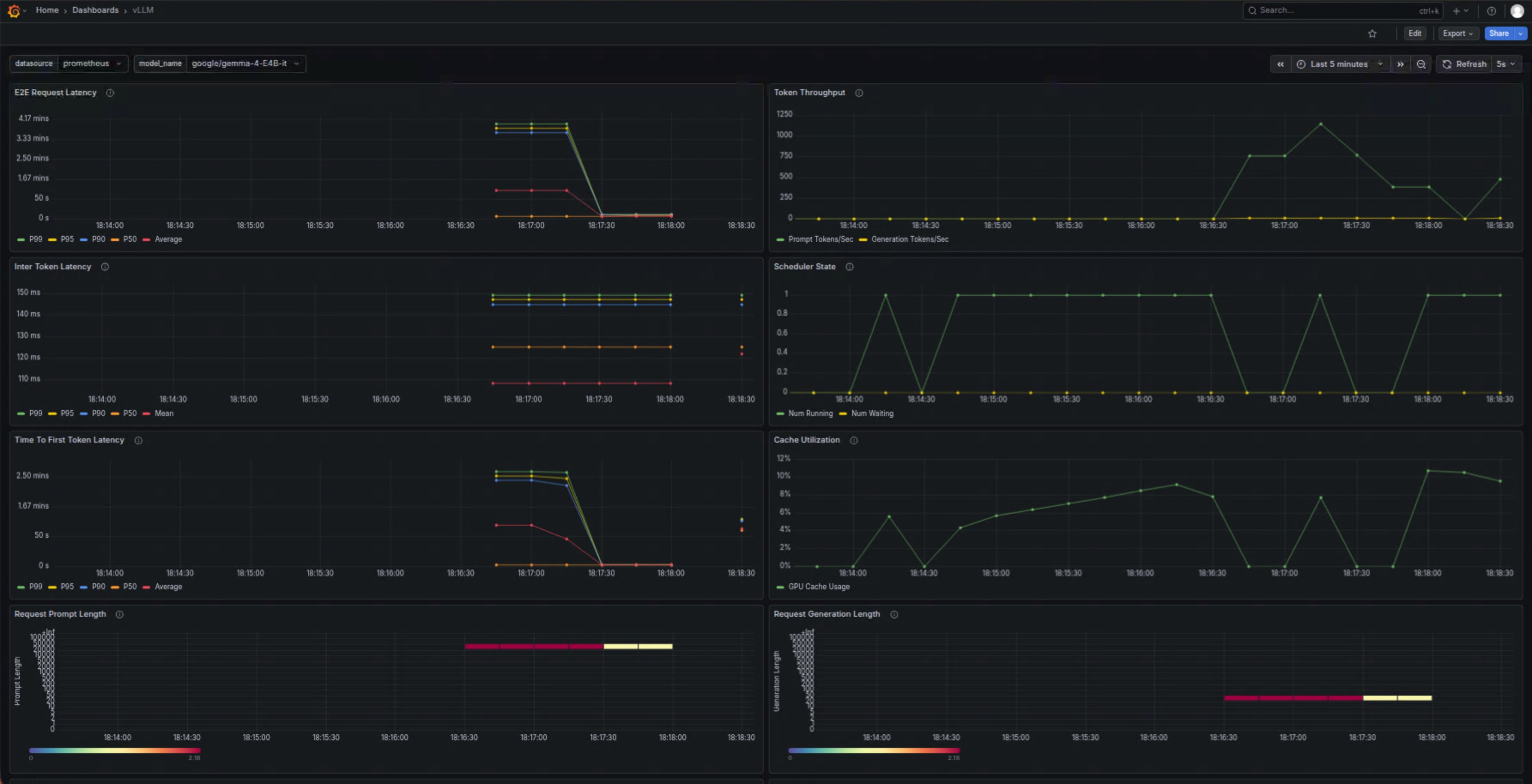
5.2 Grafana 性能监控仪表盘
vLLM 内置 Prometheus metrics 支持,我通过 Grafana 搭建了监控面板,可以实时查看以下关键指标:
- KV Cache 使用率(FP8 量化后优势明显)
- Tokens 生成速度(tokens/s)
- 请求延迟(Time to First Token 和 Time per Output Token)
- 双 B580 各自的显存占用和负载均衡情况
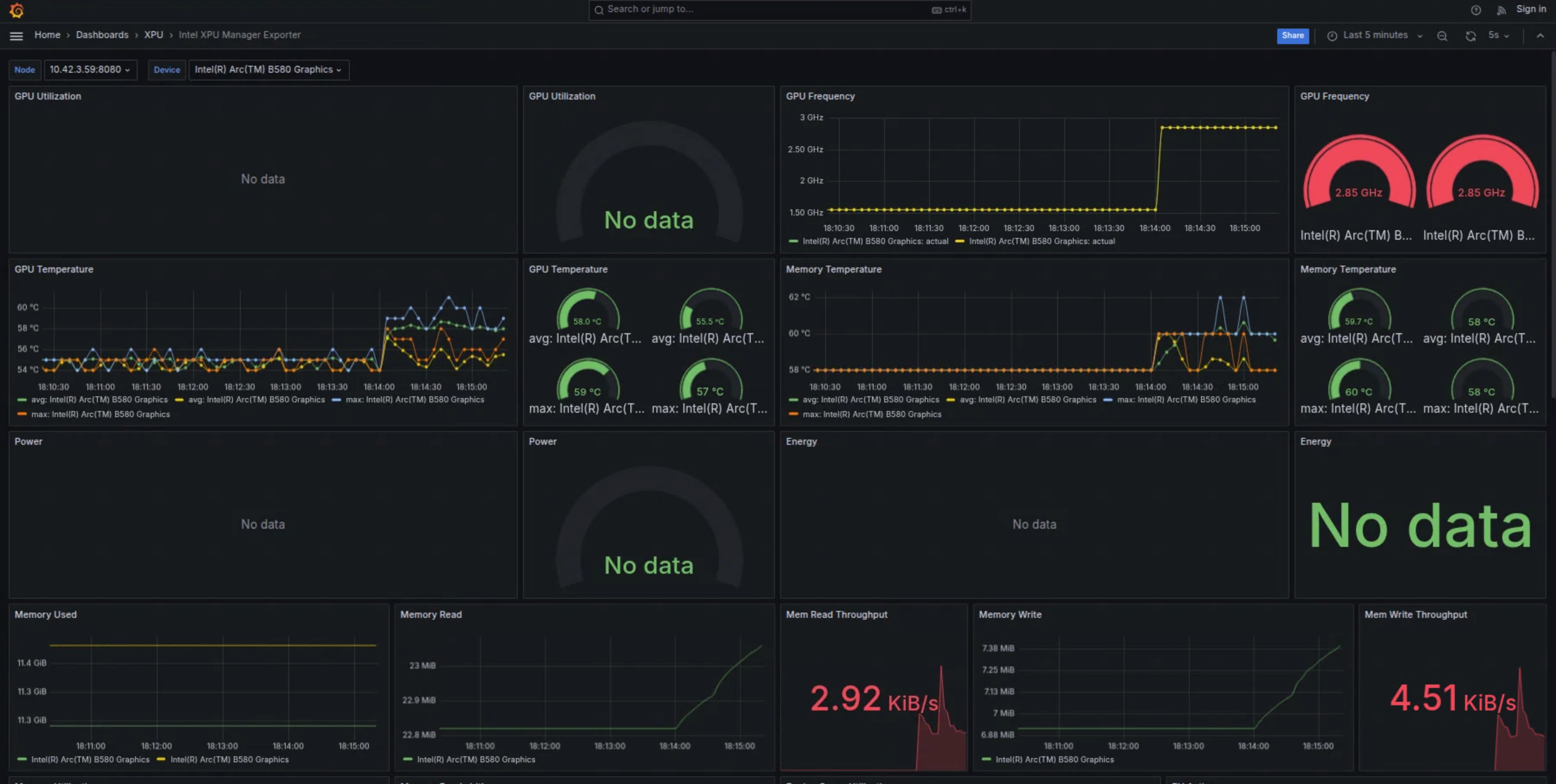
5.3 Docker Container 资源指标
除了 Grafana,我还关注 Intel XPU Manager Docker 容器层面的资源使用情况,包括 CPU、系统内存以及 XPU 显存占用。
从实际运行数据看,在 --gpu-memory-utilization 0.8 设置下,FP8 配置让模型能稳定运行在 24GB 显存以内,且长时间运行未出现明显内存泄漏。
5.4 OpenClaw 实际使用效果
最终效果才是最重要的。下面是 OpenClaw 通过 WebChat 和 WeChat 与 vLLM 服务交互的真实截图:
- WebChat 中用户自然语言触发文件修改和天气查询
- WeChat 聊天记录中多轮对话与 tool calling 执行过程
- MEMORY.md / USER.md 被成功修改的反馈
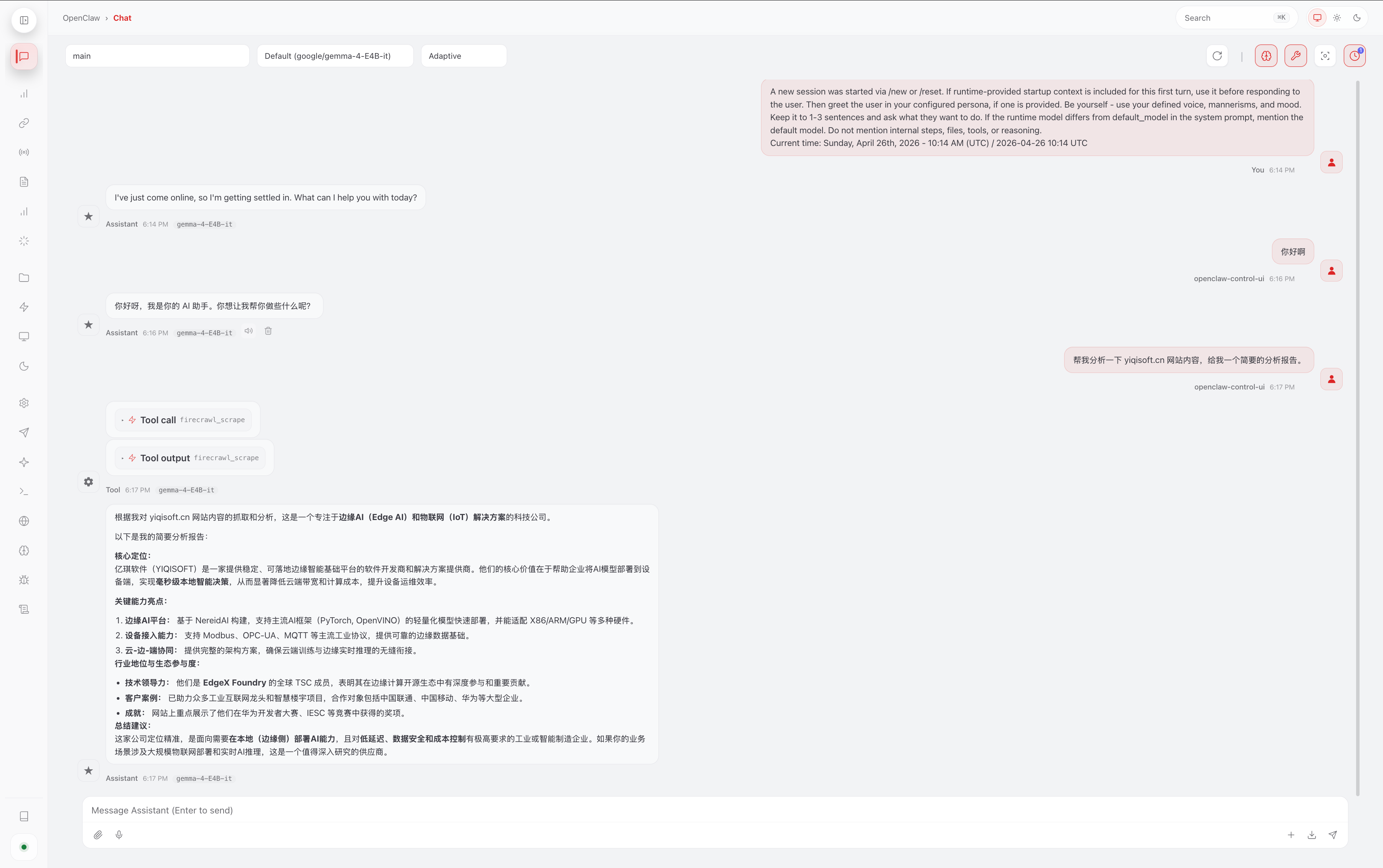
可以看到,Gemma-4-E4B-it 在本地运行时响应速度较快,tool calling 也相对稳定,基本满足日常简单 Agent 任务需求。
6. 为 OpenClaw 设计的实用 Tool Tasks
基于 Gemma-4 的 tool calling 能力,我为 OpenClaw 设计了以下几类简单但实用的工具:
文件操作类(最常用):
- 读取、修改或追加内容到 MEMORY.md 和 USER.md
- 根据用户指令更新特定章节或添加新笔记
信息查询类:
- 查询上海实时天气,并结合当地情况给出实用建议(如是否需要带伞)
- 简单日历提醒或本地信息检索
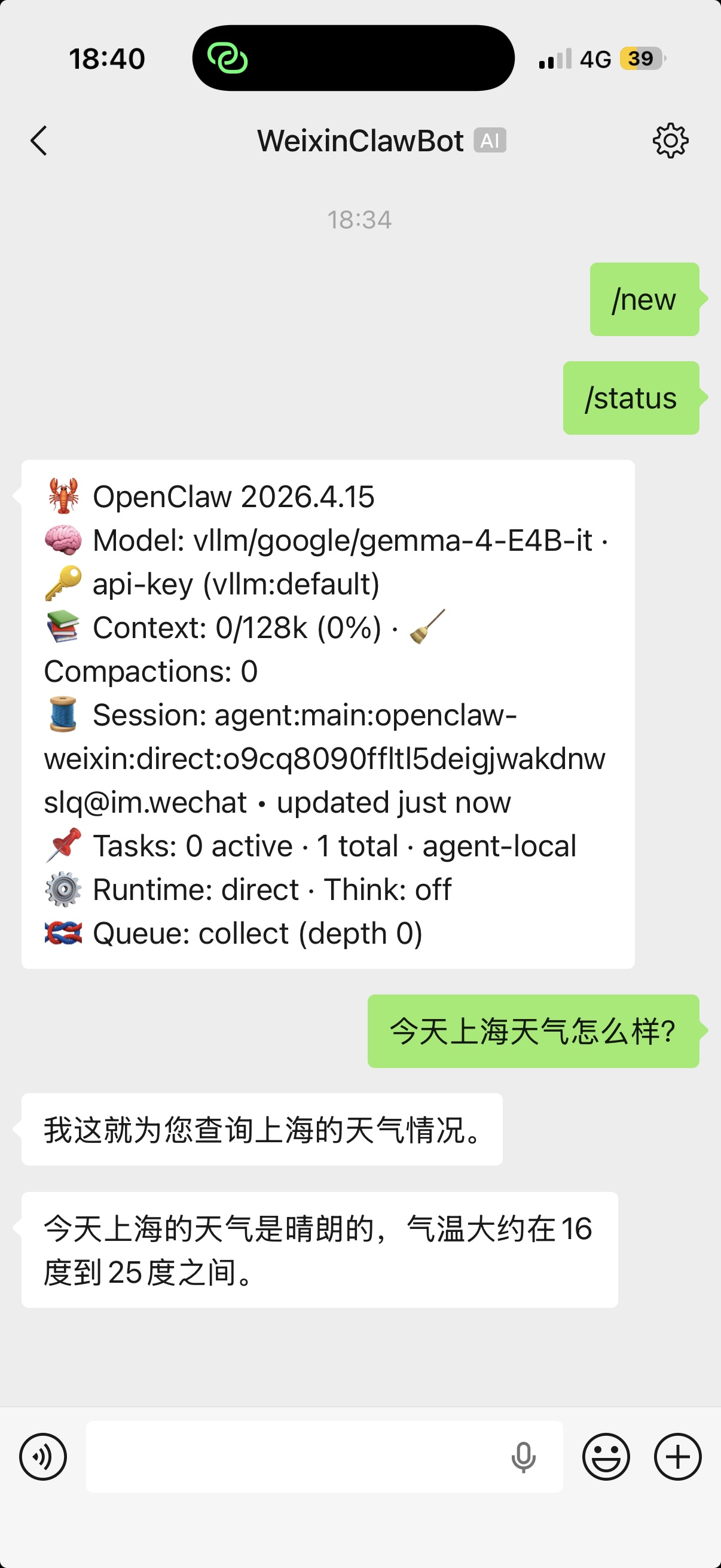
自动化工作流示例:
- “今天上海天气如何?如果下雨,请在 MEMORY.md 中记录并提醒我”
- 多轮任务:先查询信息,再修改文件,最后返回总结
这些工具使用标准的 JSON schema 定义,结合 --enable-auto-tool-choice,Gemma-4 可以比较自然地决定何时调用工具。
7. 性能表现与优化经验
在当前配置下,FP8 双量化 + 双卡 tensor parallel 让 Gemma-4-E4B-it 的显存占用控制得比较理想。实际使用中,简单对话的响应速度基本能满足 OpenClaw 的交互需求。
优化建议:
- 根据实际负载调整
--gpu-memory-utilization - 适当设置
--max-model-len以平衡上下文长度和性能 - 监控 oneCCL 通信,避免 P2P 相关问题
当然,受限于 4B 模型规模和消费级 XPU,在高并发或超长上下文场景下仍有提升空间。
8. 常见问题与注意事项
- 编译阶段:注意代理设置和 shm-size
- 运行阶段:oneCCL 通信参数(CCL_ATL_TRANSPORT、ONECCL_P2P_DISABLE 等)对双卡稳定性影响较大
- Tool calling:Gemma-4 parser 偶尔可能出现格式问题,建议在 prompt 中加强约束
- 安全:建议在内网使用,或为 API 添加认证
9. 结论与下一步计划
通过这次实践,我成功在双 Intel Arc B580 上用 vLLM v0.19.1 + FP8 跑通了 Gemma-4-E4B-it,并为其 OpenClaw 提供了稳定的本地 token 服务。虽然还有很多可以优化的地方,但整体已经能满足日常文件维护、天气查询等简单 Agent 任务。
未来计划包括:
- 尝试更多工具开发
- 探索 vLLM 新版本的 XPU 支持
- 结合多模态能力进一步扩展 OpenClaw 的功能
欢迎大家在评论区分享自己的 Intel XPU 部署经验、性能数据,或是 OpenClaw 的有趣工具想法,一起交流进步!